F5J
Electric gliders with an altimeter. The pilot launches under motor, the altimeter (AMRT) records the height at which the motor is shut off, and the pilot scores for the time flown up to the working time, plus landing points, minus a penalty for the launch height.
This page explains what is specific to F5J. What is common to all classes (account, registration, draw, grid, remote entry, results…) is in the general part.
How it is scored
- Every flight has a raw score: points for the time, plus the landing points, minus the height penalty.
- In each group, the normalised score gives 1000 to the best flight of the group and scales the rest proportionally.
- A pilot's score for each round is the maximum of their flights in that round (the original and the reflights).
- The total is the sum of the rounds, dropping the worst ones according to the drops, and subtracting the penalties.
Calculating a flight
With the FAI values (WT 600 s, 1 point per second, Ref 200 m, a = 0.5 and b = 3):
| Time | Height | Landing | Calculation | Raw | Normalised |
|---|---|---|---|---|---|
| 10:06 → 10:00 (cap) | 64 m | — | 600 + 0 − 32 | 568.0 | 1000.0 (best of the group) |
| 8:57 = 537 s | 47 m | 3 m → 40 | 537 + 40 − 23.5 | 553.5 | 974.5 |
| 9:26 = 566 s | 197 m | 5 m → 30 | 566 + 30 − 98.5 | 497.5 | 875.9 |
| 8:50 = 530 s | 247 m | 5 m → 30 | 530 + 30 − (100 + 141) | 319.0 | 561.6 |
| 5:05 = 305 s | 118 m | — | 305 − 59 | 246.0 | 433.1 |
These are the flights of round 1, group 1 of the sample competition. Each normalised score is 1000 × raw / 568, because 568 is the maximum of the group.
If the time exceeds the working time, only the working time counts: the excess earns nothing. And, with the Over the working time option ticked, the landing of that flight is worth 0.
Class settings
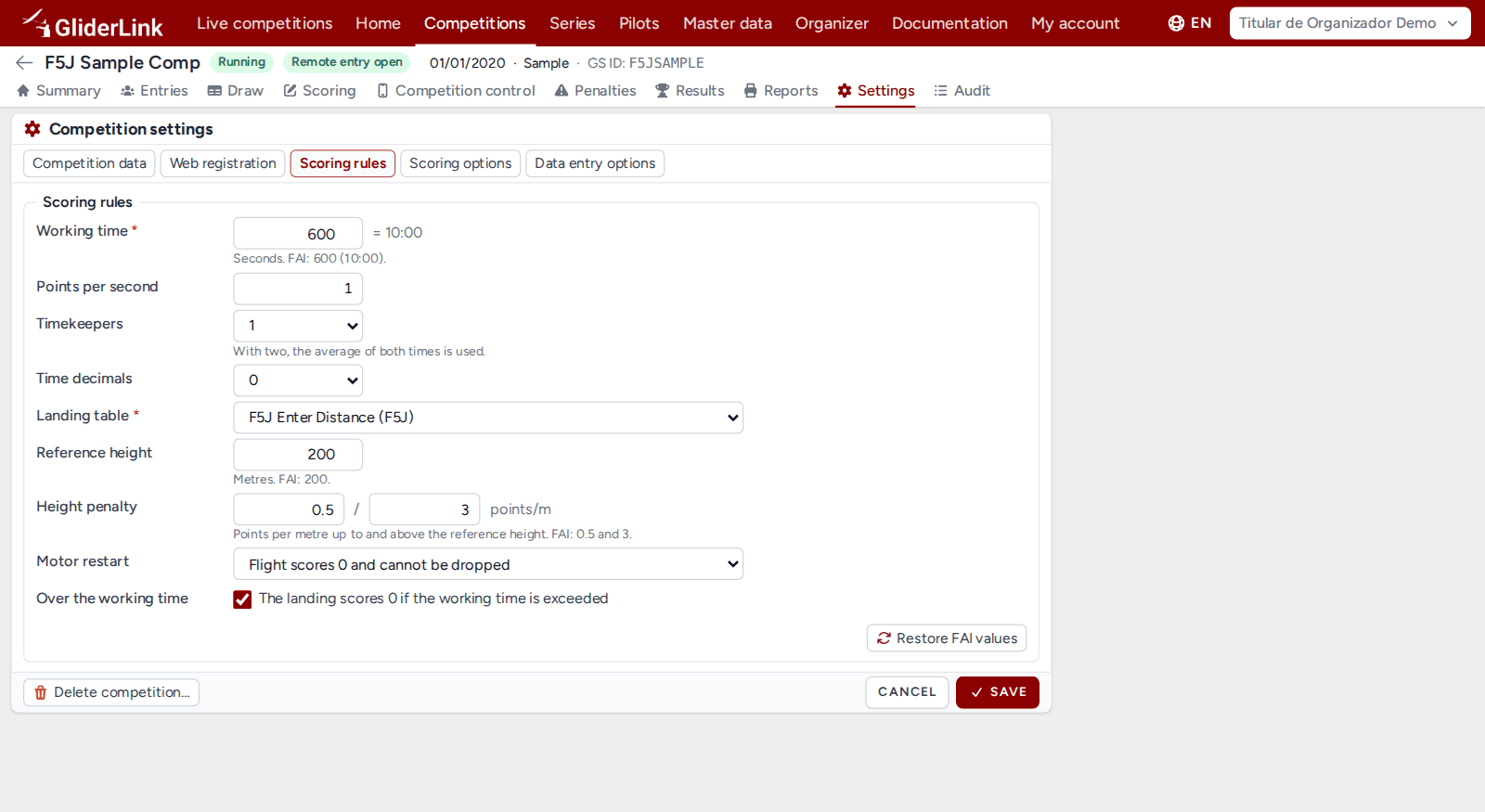
In the wizard and in Settings, F5J comes with the FAI values. You can change them, and the Restore FAI values button brings them back.
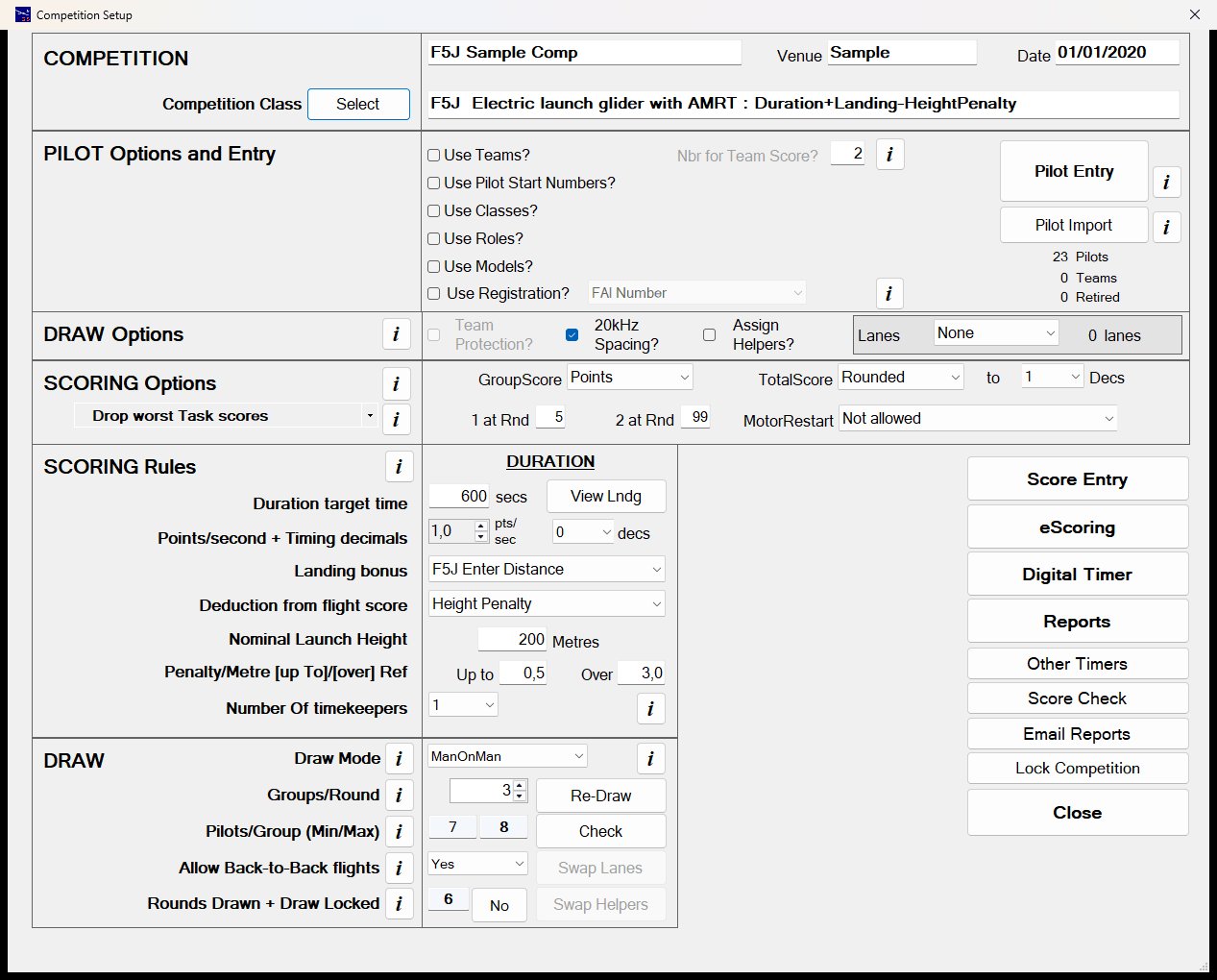 How it looks in GliderScore: Competition Setup
| Setting | FAI value | What it does |
|---|---|---|
| Working time | 600 s (10:00) | The maximum time that scores. Written in seconds. |
| Points per second | 1 | Points each second flown is worth. |
| Timekeepers | 1 | With two, the average of the two times is used (and a second time column appears). |
| Time decimals | 0 | How many decimals the timing has: 0, 1 or 2. |
| Landing table | F5J (1 m → 50 … 10 m → 5) | The points each landing distance gives. Tables are managed in Master data. |
| Reference height | 200 m | Up to this height the penalty is the gentle one; above it, the steep one. |
| Height penalty | 0.5 and 3 points/m | Points subtracted for each metre up to the reference and for each metre above it. |
| Motor restart | The flight is worth 0 and cannot be dropped | What happens if the motor is restarted in flight. The other options are worth 0 and can be dropped and not allowed (no restart column). |
| Over the working time | Landing 0 | If the flight exceeds the working time, its landing is worth 0. |
Scoring options
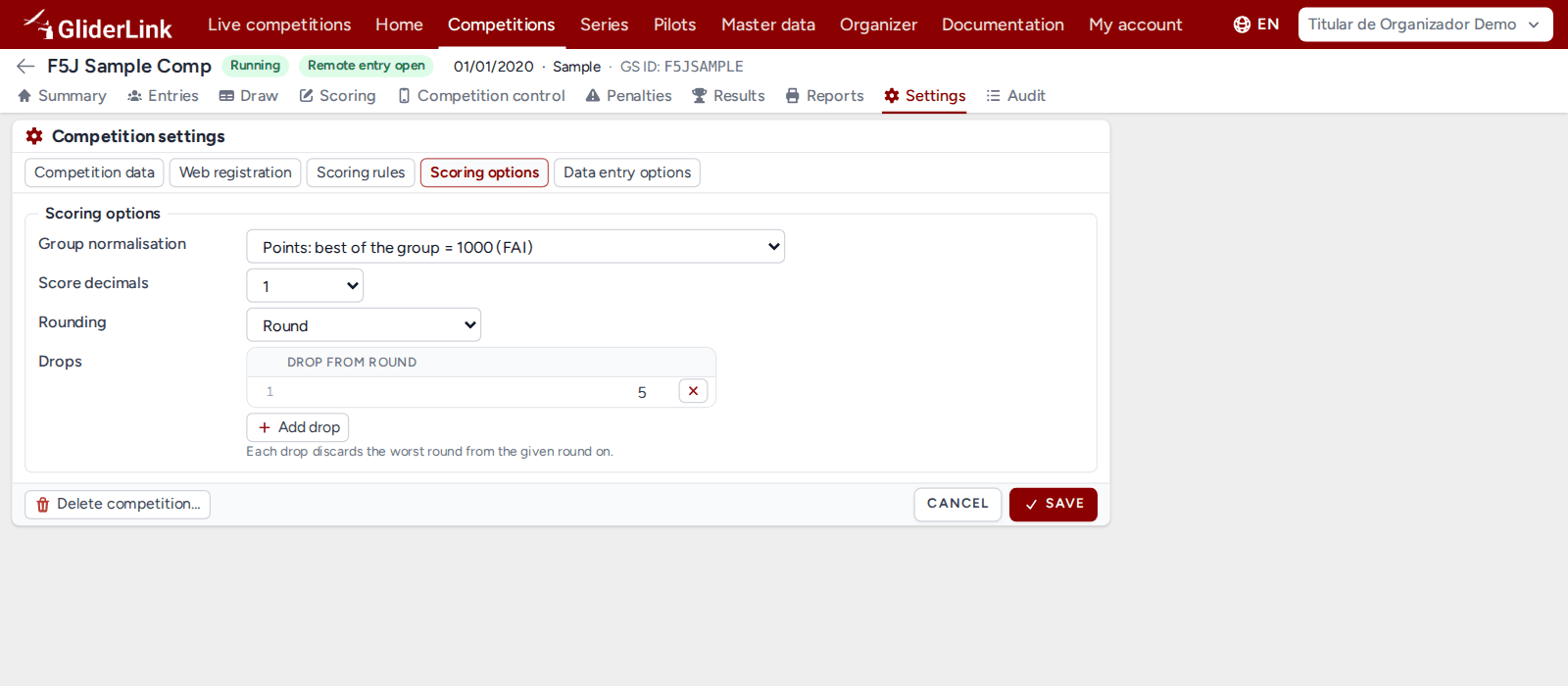
- Group normalisation: Points (best of the group = 1000, the FAI rule), Time (best time of the group = 1000, plus the landing) or None (the raw score is used).
- Score decimals and Rounding (round or truncate). The application replicates GliderScore's rounding.
- Drops: each row removes the worst round from the round indicated onwards. By default there is one drop from round 5; adjust it to the rules of your contest. A flight with a motor restart can be left as non-droppable.
Changing the working time, the points per second, the table, the reference height, the penalties or the timekeepers recalculates every flight of the competition. The application warns you before saving.
Data entry options
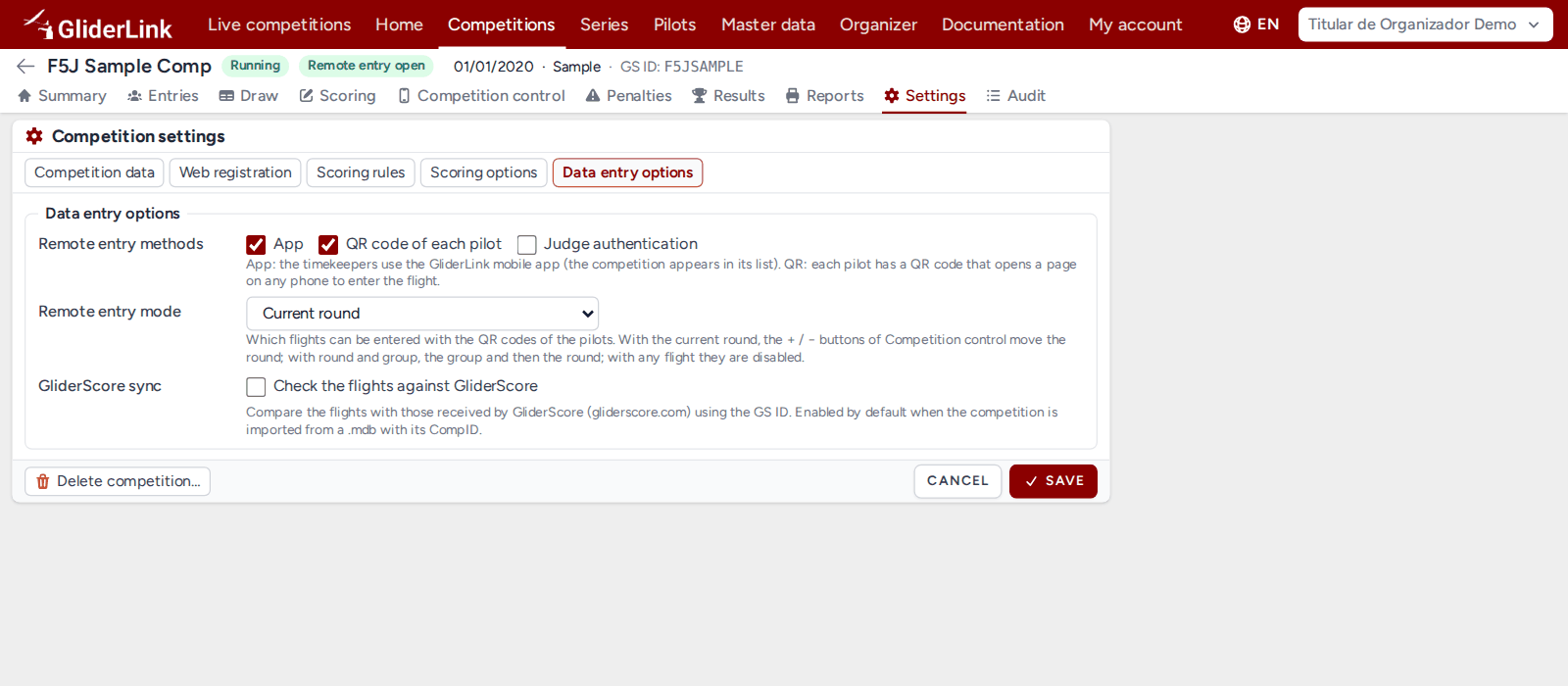
Here you enable the remote entry methods (App, QR code of each pilot and Judge authentication) and its mode (see Competition control). The Synchronise with GliderScore option lets you compare the flights with those on gliderscore.com using the GS ID.
The grid in F5J
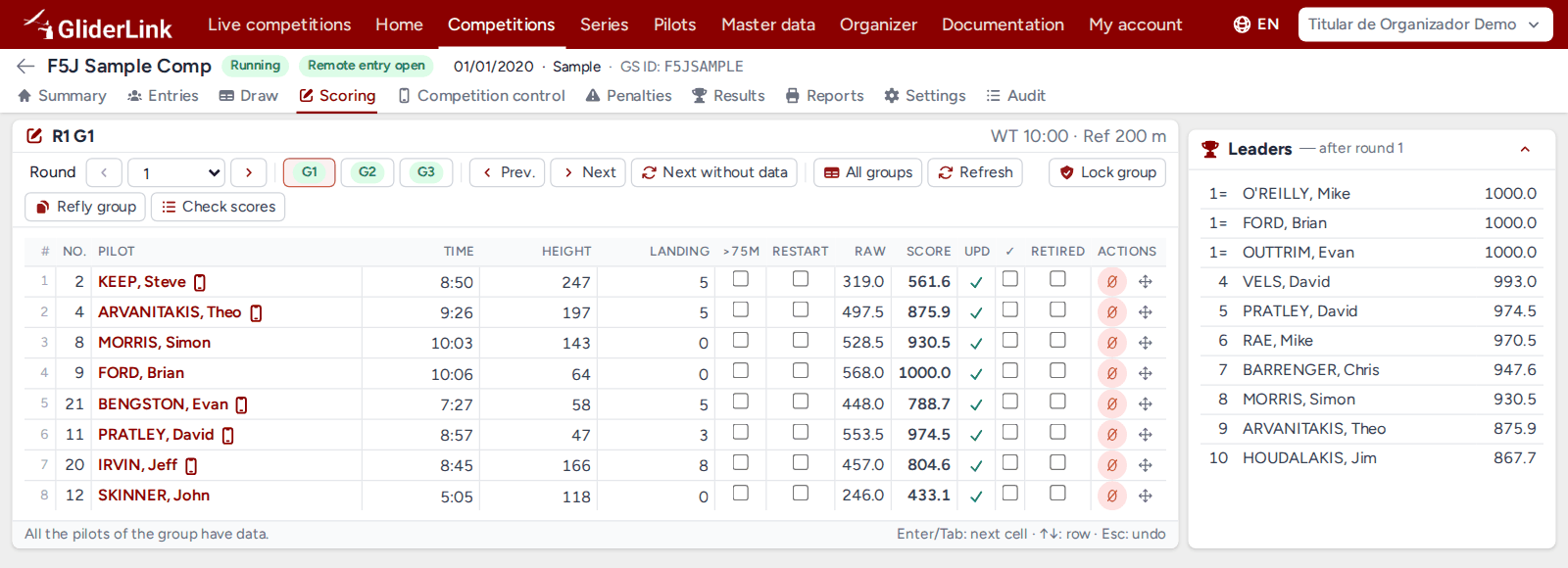
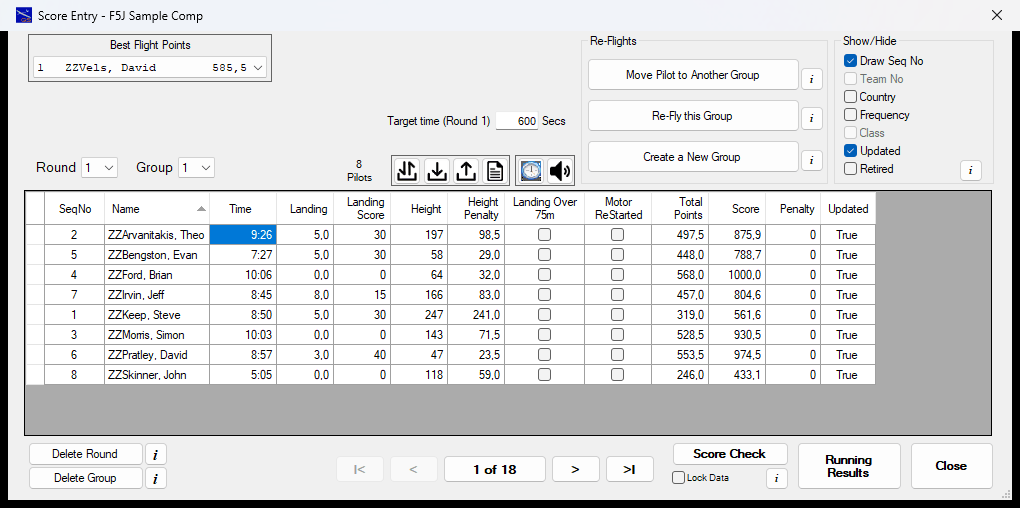 How it looks in GliderScore: Score Entry
| Column | What you type |
|---|---|
| Bib and Pilot | From the entries. Clicking the name opens the pilot's details. |
| Time | Minutes and seconds run together: 850 is 8:50. With time decimals, 850.4 is 8:50.4. A dot or a comma is accepted. Seconds must be below 60: 875 gives an error. |
| Height | Metres, a whole number read from the AMRT. If left empty, it is calculated as 0. |
| Landing | The landing distance in metres: 0 or a value of the table. If it is not valid, the error lists the values that are accepted. |
| >75 m | Landing beyond 75 m. Ticking it makes the flight worth 0 and sets its data to zero; while it stays ticked, it cannot be edited. It asks for confirmation if there was already data. |
| Restart | Motor restart. Same as the previous one. It does not appear if the option is not allowed. |
| Raw and Score | The result: the raw score and the group-normalised one. They are calculated automatically as each cell is saved. |
| Upd, ✓, Retired, Actions | As explained in the general part. |
A time greater than the working time plus 5 minutes is rejected with a check the time message. A height above 400 m is saved without a warning: check it yourself.
Entry by app and by QR
Flights that arrive from the app or from each pilot's QR code go into the same grid with the same validations. For F5J:
- The maximum time accepted is the working time minus one second (9:59 with a working time of 10:00). The app sends the real time from the altimeter: it is stored as it is in the submission, but the flight gets the maximum applied.
- The QR asks for time, height, landing (in a drop-down with the distances of the competition's table), penalty and the timekeeper's name.
- A landing beyond the table is sent as >X m and <75 m and is worth 0 landing points. >75 m leaves the flight at 0.
Results
In Results → Overall the standings show the score of each round, with the dropped ones crossed out, the penalties, the total and the percentage against the winner.
- Ties: they share the place, shown with «=». In a fly-off, ties are resolved by the place in the preliminary.
- Teams: the best totals of each team are added (how many count is set by the competition).
- Restricted scoring: when limiting to a country, club or class you can re-normalise every group without the pilots from outside, so that there is always a 1000 per group. It is useful in national championships with foreign pilots.
- Retired pilots still appear with what they have flown.